
The Market Problem.
Employers need to attract candidates, but running recruitment advertising introduces decisions about channels, content and budget. The design opportunity is to make those decisions approachable.
Making a complex recruitment workflow easier to navigate, with AI recommendations people can review, understand and correct.
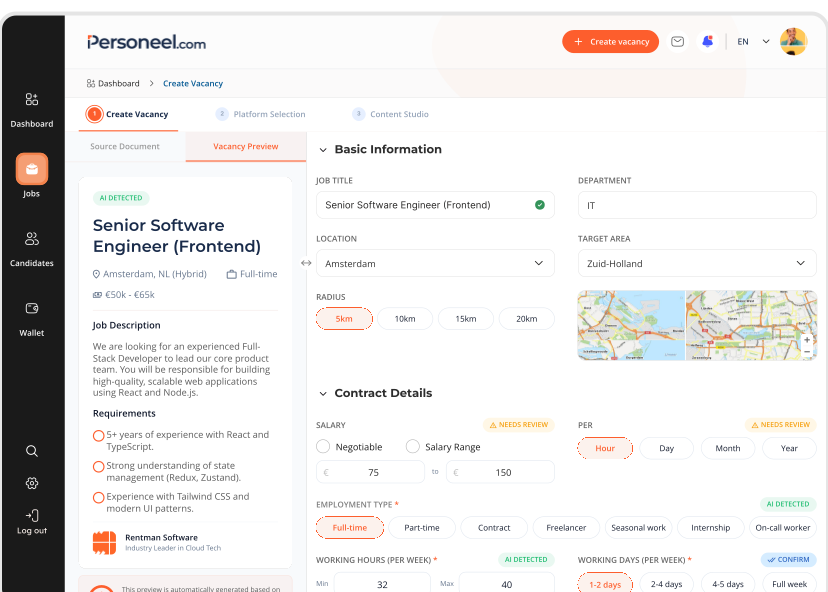
From a job description to a reviewable vacancy.
Personeel.com is a Dutch B2B recruitment marketing platform for employers who want to manage their own recruitment campaigns.
Creating a campaign involves more than writing a vacancy. Employers need to choose channels, prepare content, understand costs and follow up with candidates, often without specialist marketing knowledge.
Bring those tasks into a coherent workflow. Use AI to help with preparation while making its recommendations understandable, editable and subject to human review.
Understand the work behind the campaign before designing the workflow.
I interviewed account managers and stakeholders, benchmarked recruitment tools and used usability testing to connect workflow insights to product decisions.
Employers need to attract candidates, but running recruitment advertising introduces decisions about channels, content and budget. The design opportunity is to make those decisions approachable.
A self-service product needs to support the work that account managers previously guided. Missing information and unclear next steps can interrupt a campaign before it is ready.
Two working archetypes helped frame different needs for guidance and control.
 Archetype 01
A clear next step, minimal setup and guidance that does not assume marketing expertise.
 Archetype 02
More control over campaigns and clear information to understand and communicate performance.
These conversations helped translate the existing service into product requirements: what information is collected, where preparation breaks down and which decisions still need human judgment.

Map the information needed for a campaign, rather than treating the job description as the complete brief.

Photos and channel requirements need clear prompts at the point where they become relevant.

The workflow continues after an application arrives. Candidate management belongs in the product scope.

The manual setup behind screening highlighted an opportunity to connect vacancy requirements with configurable screening rules.
A good extraction is only useful if people can finish the workflow.
Usability testing highlighted friction in asset handling and unclear validation. I used the findings to separate implementation failures from interaction problems, so each issue could be addressed by the right owner.
Failures such as unresponsive controls and broken uploads need reproducible steps and an engineering owner.
Unexplained requirements and ambiguous recommendations need clearer guidance and a design response.
From a supplied identity to a visual language of my own.
Nine product screens, composed into a continuous motion study for this case study.
Given: logo + core colors. Developed: visual direction, supporting palette and interface system.

Brand accents → supporting surfaces.
ABCDEFGHIJKLMNOPQRSTUVWXYZ
0123456789
abcdefghijklmnopqrstuvwxyz
0123456789
I explored character, contrast, data and atmosphere to define how Personeel could feel beyond its existing logo and colors.
A character-led welcome makes the AI proposition feel approachable.
I developed the four concepts; leadership selected option 4 for its simple, premium feel.
The centered form gives the page a clear visual destination.
Orange and blue move to the edges; the action retains a solid orange accent.
Translucency, fine texture and curved light create detail around a simple layout.
The visual system takes on a functional role inside the product: distinguish information, reveal exceptions and make the next action clear.
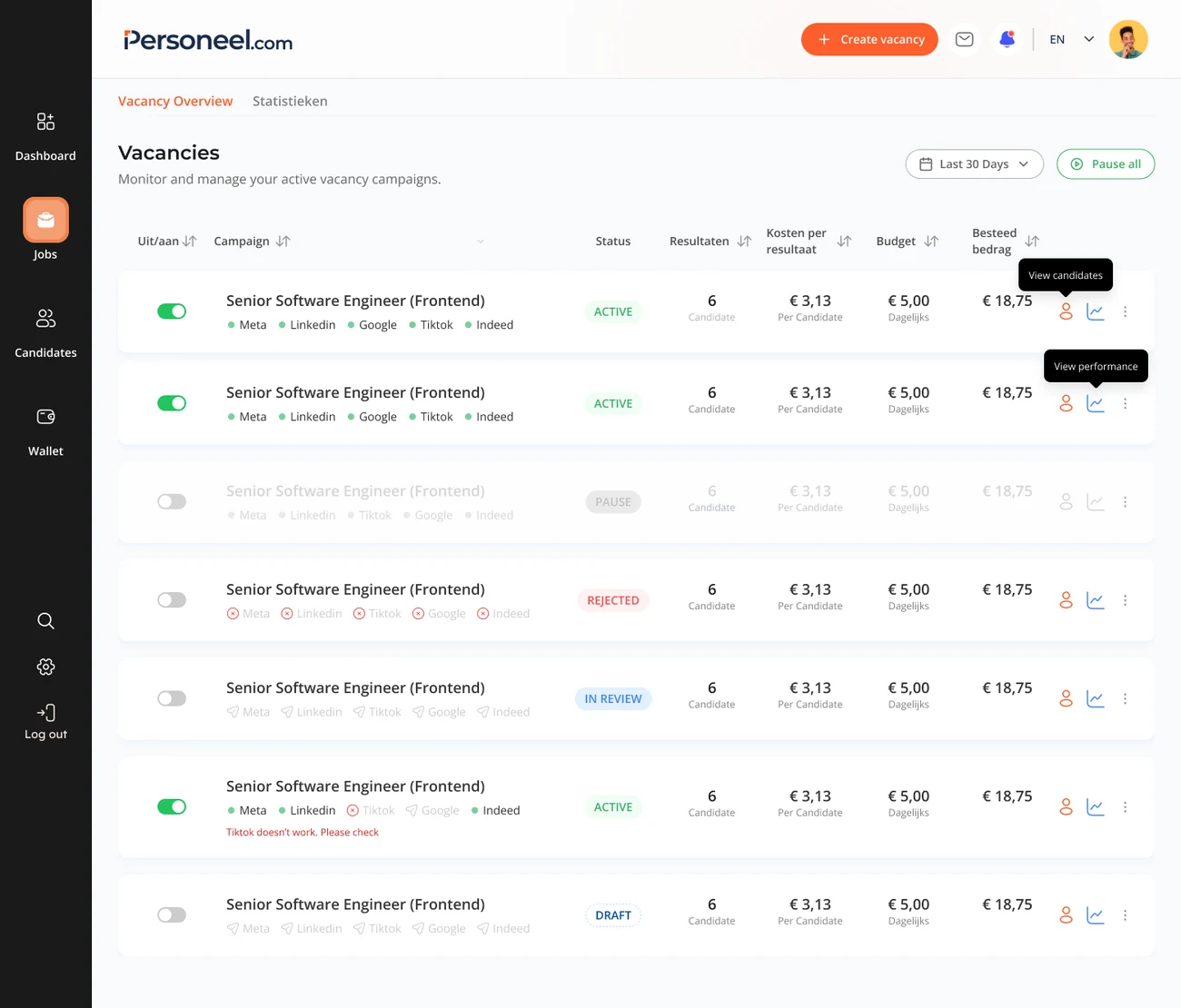
Interface values illustrate the design; they are not measured product outcomes.
I built a 30+ component system with Figma Variables and tokens, from visual foundations to interaction states and handoff guidance.
Brand palettes, neutral surfaces and semantic status colors establish a shared visual language.
Brand · Neutrals · Status colorsEach decision starts with a user problem. The interface makes the response tangible.
One connected journey, from creating a vacancy to managing the people who apply.
Create vacancyBring the job description into the workflow.
How can an employer judge a suggestion they did not write?
I designed uncertainty flags, plain-language explanations and quick overrides so employers can question a recommendation and correct it. The split view brings source material and the vacancy closer to the editing task.
The source document sits alongside the editor so employers can compare extracted details with the original content before confirming them.
Uncertainty flags distinguish fields that need a closer look. Plain-language explanations help users understand why a suggestion needs their judgment.
Employers can edit or override AI-generated recommendations. AI helps prepare the vacancy; the person reviewing it makes the final decision.
Support a channel decision without hiding the reasoning.
The revised layout separates included channels from paid options and makes recommendations easier to scan. Explanations and overrides remain essential: the recommendation supports the employer’s decision.
Included channels are separated from paid options, making the distinction between available value and additional spend clearer.
Visible selection states let employers review their channel mix and change individual choices before continuing.
A recommendation needs a reason that an employer can assess. The user should be able to question it and choose a different channel.
A learning from testing: a match score can steer a choice without making it better informed. The rationale matters as much as the recommendation.
Shift the work from configuring every variation to reviewing useful options.
I explored three ways to give employers control over campaign visuals. Each iteration changed when that control appeared: from configuring everything upfront, to following a sequence, to reviewing a prepared starting point.
The shift was in when to offer control. I moved detailed configuration out of the starting path, while keeping review and correction in the employer’s hands.
The third direction changes the starting task from configuring an ad to judging prepared options. Brand settings, platform tabs and individual edits remain available, so employers can correct an output without managing every creative setting upfront. AI supports preparation; the employer keeps the final decision.
A clear checkpoint before committing to a campaign.
The review page brings the creative preview and itemised costs together. Employers can check the content, distinguish included channels from paid spend and understand the commitment before continuing.
Keep campaigns, performance and candidate follow-up connected.
Campaign and channel status belong together. A platform problem needs to be visible in the overview, even when the overall campaign is active.
Finishing a form is not the same as making a successful hire.
The measurement focus is the journey from seeing a vacancy to submitting an application and progressing as a candidate. Each stage answers a different question.
Can visitors find and use the application entry point?
Where do form or validation failures interrupt the journey?
Do applications progress to useful conversations and appointments?
This section describes the evaluation framework. It does not claim a measured conversion lift.
A connected recruitment experience, with human judgment built into the AI workflow.
My contribution spans research, interaction design and a shared component system across the recruitment journey. The work brings vacancy creation, campaigns, content, payment and candidate management into a common design framework.
The most useful design input often sits inside a manual workflow. Understanding that work helps identify what can be simplified, what can be supported by AI and what still needs a person’s decision.
Continue validating the end-to-end flow with employers, prioritise the remaining friction and distinguish implementation progress from measured user outcomes.